
The complete product guide
How Empikalyze Works
Empikalyze is an AI-powered resume screening and candidate evaluation platform for recruitment agencies, staffing teams, and HR teams. You create a screening job with a job description and up to 100 resumes; Empikalyze reads every resume, scores how well each candidate fits, and returns a ranked shortlist with per-candidate analysis. You pay ₹5 per successfully processed resume — nothing for failures, seats, or storage.
No ATS required · No per-seat fees · Failed resumes never consume credits
Empikalyze at a glance
What it does
AI resume screening & candidate ranking
Built for
Agencies, staffing & HR teams
Batch size
1–100 resumes per job
Pricing
₹5 per processed resume
Data
Never used to train AI models
Your role
You make every hiring decision
Overview
What Empikalyze Does
Empikalyze automates the first pass of resume screening — the repetitive read of every resume against a job description — and turns it into a ranked, explainable shortlist.
Screens every resume in a job against the job description and your additional requirements
Scores each candidate 0–100 and ranks the shortlist from strongest to weakest fit
Shows matched and missing skills, experience fit, education fit, strengths, and gaps per candidate
Extracts candidate names, emails, and phone numbers found in resumes
Lets you view and download the original resume inside the app
Exports shortlists to CSV, JSON, or PDF for clients and hiring managers
Retries failed resumes without consuming credits for failures
Keeps every job, resume, and result in your organization for future review
Who it's for
Who Empikalyze Is Built For
Empikalyze is designed for teams whose recruiters read large volumes of resumes for multiple roles every week.
Recruitment agencies
Screen client mandates in bulk, build defensible shortlists, and explain rankings to clients with per-candidate evidence.
Staffing & HR consultancies
Give every recruiter the same consistent first-pass evaluation across roles, sectors, and locations.
Internal recruitment teams
Handle high-volume applicant flow without an ATS migration — upload, screen, rank, and export.
End-to-end
The Screening Workflow at a Glance
From an empty workspace to a ranked shortlist in eight steps. Each step is explained in detail below.
Create a screening job
Give the job a title (up to 200 characters) in the Workspace. One job = one role = one batch of resumes.
Add the job description
Paste the JD (up to 20,000 characters) or upload it as PDF, DOC, DOCX, or TXT. Optionally add Additional Context for must-haves.
Upload resumes
Attach 1–100 resumes per job — PDF, DOC, or DOCX, up to 10 MB each. Files upload directly to secure storage.
Processing begins
Empikalyze verifies every upload, reserves credits for the batch, and starts processing each resume independently.
AI analysis
Each resume is read against the job description and your additional context — skills, experience, education, and evidence only.
Matching & scoring
Every resume receives a 0–100 match score, matched/missing skills, experience evaluation, strengths, gaps, and summaries.
Ranked results
The job page fills in progressively with candidates ranked by match score, filterable by tier, score band, and status.
Review & decide
Open any candidate for full insights, view or download the original resume, export the shortlist — then decide next steps.
Steps 1–2
Create a Screening Job and Add the Job Description
Everything starts in the Workspace with one screen — no wizards, no separate setup steps.
Step 1 — Create a screening job
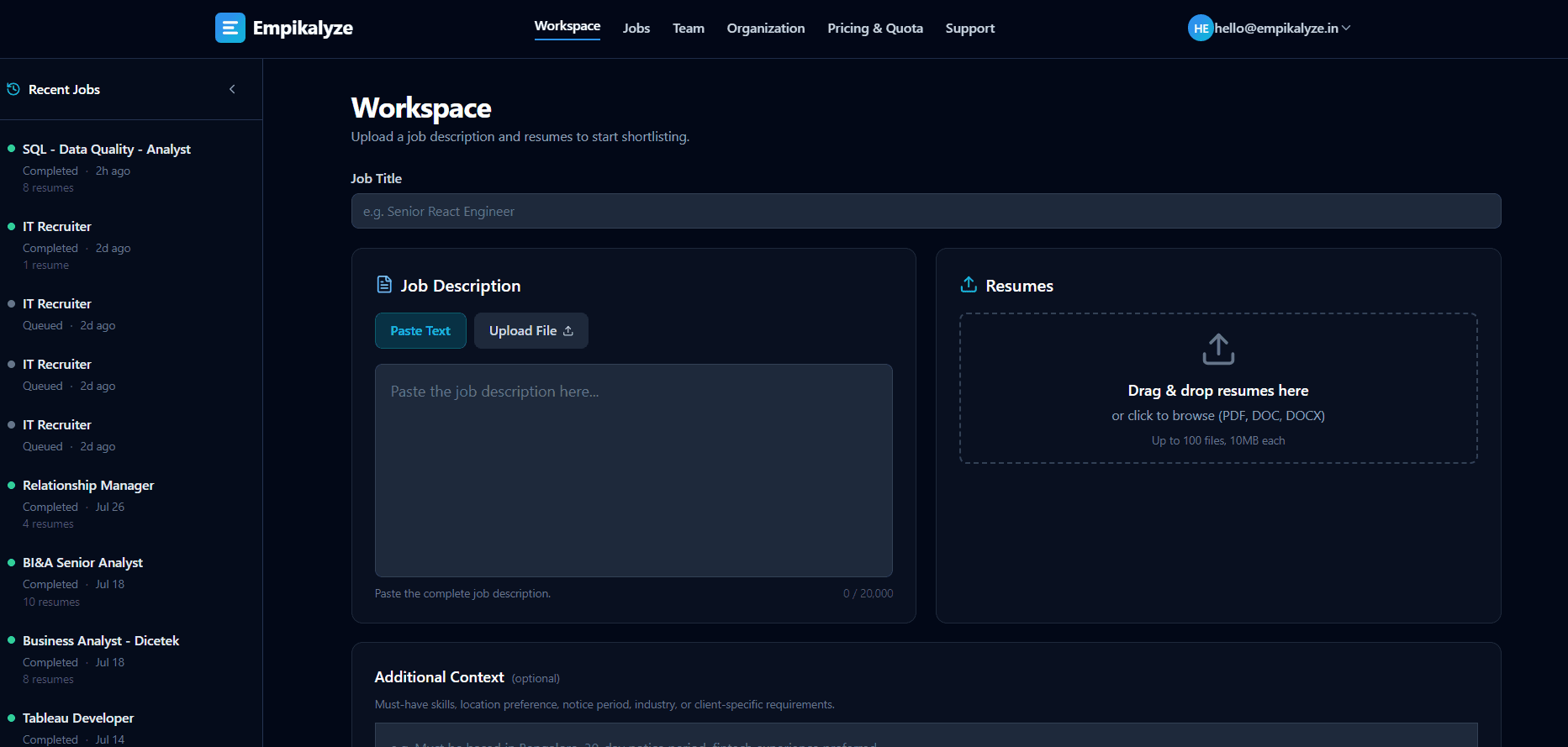
In the Workspace, enter a job title of up to 200 characters — for example, “Senior Java Developer — Bengaluru — Fintech Client”. A screening job pairs exactly one job description with one batch of resumes, so each role gets a clean, self-contained evaluation. Recent jobs appear in a sidebar for quick access.
Step 2 — Add the job description
Paste the JD text (up to 20,000 characters) or upload it as a PDF, DOC, DOCX, or TXT file of up to 10 MB — Empikalyze extracts the text for you. The JD defines the baseline hiring requirements for every resume in the job.
Optional — add Additional Context
Every job includes an optional Additional Context field (up to 4,000 characters) for requirements that are not in the JD: must-have skills, location constraints, notice periods, industry or client-specific preferences. The AI treats this as an extension of the requirements and adds a per-candidate summary of how well it is satisfied — for example: “candidate meets the Bengaluru location requirement, but the 15-day notice period is unverified.”
Step 3
Upload Resumes in Bulk
Drag and drop the whole applicant pile once — Empikalyze handles the rest.
Batch size
1–100 resumes per screening job
Formats
PDF, DOC, DOCX (text-based)
File size
Up to 10 MB per resume
Files upload directly from your browser into secure storage — duplicates (same name and size) in a batch are skipped automatically, and every upload is verified before processing starts. Need more than 100 resumes for a role? Simply create a second job for the next batch.
Image-only or scanned resumes cannot be read yet — OCR support is under development. If such a file slips in, it fails individually (without consuming a credit) and the rest of the batch continues unaffected.
Steps 4–5
Resume Processing and AI Analysis
After you submit, each resume is processed independently — one problem file never blocks the batch.
Step 4 — Processing begins
Empikalyze verifies every upload, reserves credits for the batch, and moves each resume through Queued → Processing → Completed or Failed. The job page updates live as results arrive, and candidate cards appear progressively — no waiting for the whole batch to finish. If a resume stops making progress, Empikalyze automatically marks it failed so its credit is returned and it becomes retryable.
Step 5 — AI analysis
The AI reads the complete text of each resume against the job description and your Additional Context. Before analysis, personally identifiable information (PII) is sanitized from the resume content using built-in PII guardrails. It evaluates only evidence actually present in the resume — it does not invent skills, experience, or education — and it normalizes equivalent skills (for example, “MS Excel” and “Microsoft Excel” count as Excel) before deciding what matches.
How Empikalyze uses AI
Steps 6–8
Scoring, Ranked Results, and Candidate Insights
Every processed resume becomes a scored, explained candidate card on a single ranked results page.
Step 6 — Candidate matching and scoring
For each successfully processed resume, the AI produces:
- A 0–100 match score against the job
- Matched skills and missing skills
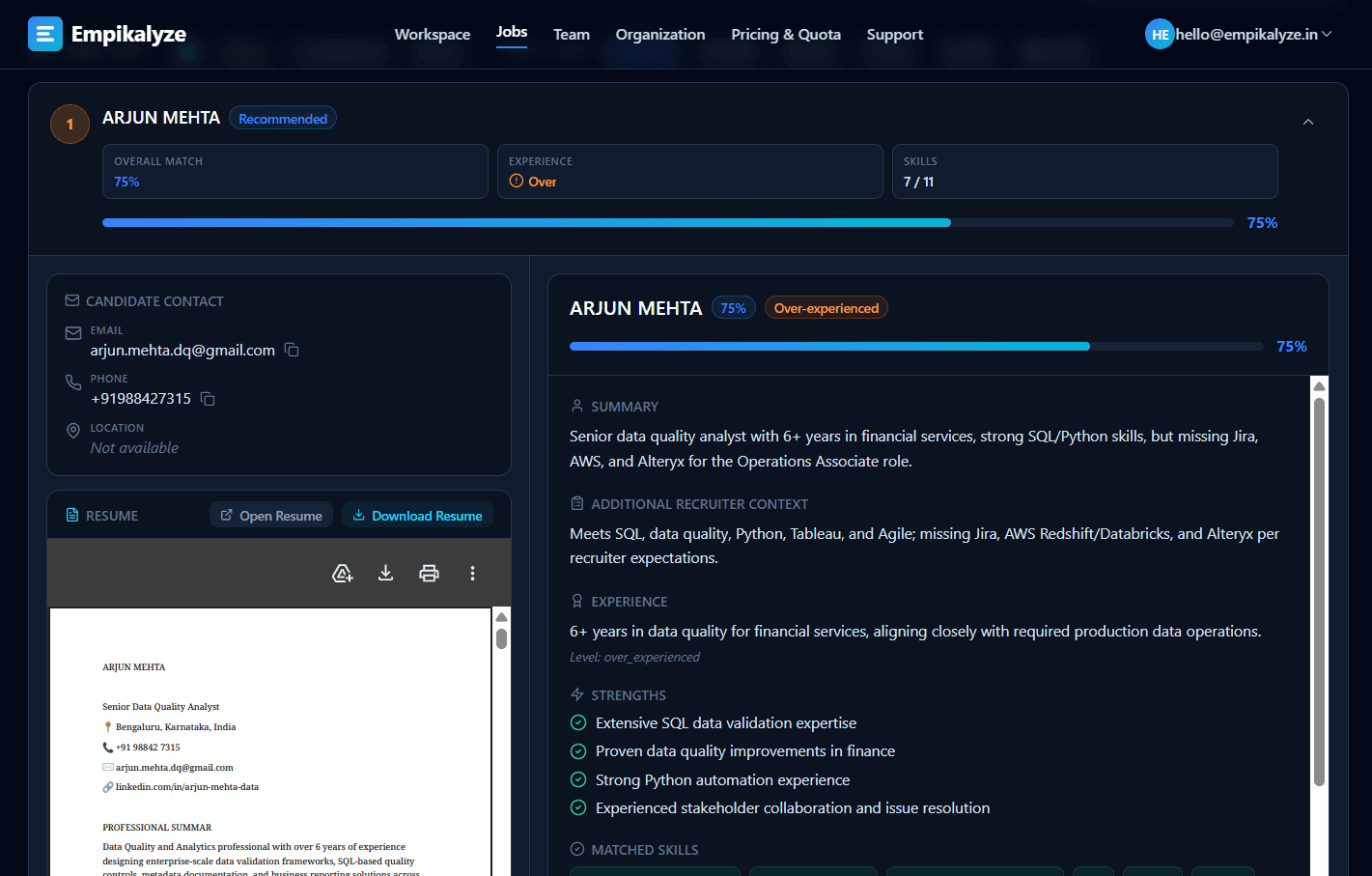
- Experience level: exact match, under-experienced, or over-experienced, with a relevance note
- Education fit in the job's context
- Key strengths and notable gaps
- A concise overall summary
- A summary of how well the candidate meets your Additional Context
- Candidate name, plus email and phone found in the resume
Want to see these outputs against real job descriptions, resumes, and actual screening results compared side by side? Explore our screening benchmarks.
Step 7 — Ranked results
Candidates are ordered by match score, highest first, and grouped into three tiers:
| Tier | Match score | Meaning |
|---|---|---|
| Highly Recommended | 85–100 | Strongest alignment — review first |
| Recommended | 70–84 | Good fit with some gaps |
| Review Recommended | Below 70 | Weaker fit — still fully visible for your review |
Narrow the list with filters by tier, score band, and processing status, or search instantly by candidate name and file name. Export the shortlist to CSV, JSON, or PDF — including contact details and full analyses — for clients and hiring managers.
Step 8 — Candidate-level insights
Expand any candidate to see the complete analysis next to their contact panel. The original resume opens in a built-in viewer and can be downloaded with its original filename, so you can verify every AI observation against the source document before deciding next steps.
Outcomes
What Happens When Processing Succeeds, Fails, or a Job Fails
Empikalyze is strict about one rule: you only pay for resumes that are successfully processed.
Resume succeeds
The result appears immediately in the ranked list with the full candidate analysis, and exactly one credit is consumed. Results stay available for review, filtering, searching, and export at no further cost.
Resume fails
The resume is marked Failed with the reason shown on the job page, and its reserved credit is returned — failures never consume credits. The rest of the batch is unaffected. Common causes: unsupported format, corrupted file, or unreadable text.
Entire job fails
Rare job-level failures (for example, not enough credits at submission or a processing interruption before any resume was analyzed) mark the job Failed with an error message. Retry Job then reruns the whole job reusing the same uploaded files — nothing is re-uploaded or duplicated.
Partial success is normal and safe
Recovery
Retry and Recovery Rules
Retries are built around two actions, and both protect you from double-charging.
| Situation | What happens | Credits |
|---|---|---|
| Job finished, some resumes failed | Retry Failed Resumes reprocesses only the failed resumes. Successful results are untouched and remain visible. | Credits are reserved again only for the retried resumes and consumed one-by-one as each succeeds. Another failure returns the credit again. |
| Entire job failed | Retry Job reruns the same job with the same files — no re-upload, no duplicate jobs or records. | Credits previously consumed by that job's successful resumes are returned first, then reserved again for the batch; each resume consumes one credit only when it succeeds. |
| A retry fails again | The resume is marked Failed again with the updated reason and stays retryable — there is no retry limit. | The reserved credit is returned again. |
| A resume stops making progress | When you view a job that is still processing, Empikalyze automatically detects stalled resumes and marks them Failed with a timeout reason, making them retryable. | The reserved credit is returned. |
Worked example — 50 resumes uploaded, 40 succeed, 10 fail
- Job finishes as Completed. 40 candidates appear in the ranked shortlist with full analyses; the 10 failed resumes are listed with their error reasons.
- Credits: exactly 40 credits are consumed — one per successful resume. The 10 failures return their reserved credits immediately.
- Retry: the page shows “Retry Failed Resumes (10)”. Clicking it reprocesses only those 10 files; the 40 successful results are not reprocessed and remain visible throughout.
- After the retry: each resume that now succeeds consumes one credit and appears in the rankings; any that fail again return their credits and remain retryable.
- Worst case: if all 10 fail again, you have paid only for the 40 successful analyses — never for a failure.
Credits
Quota and Credit Consumption
Resume Processing Credits are the unit of usage. One credit processes one resume, once, successfully.
What consumes credits
- Each successfully processed resume — exactly one credit, once
- A retried resume that succeeds — one credit, only when it succeeds
What never consumes credits
- Failed resumes — reserved credits are always returned
- Viewing, filtering, searching, or exporting results
- Opening candidate details, viewing or downloading resumes
- Adding recruiters, inviting teammates, or inactive users
How the credit balance works
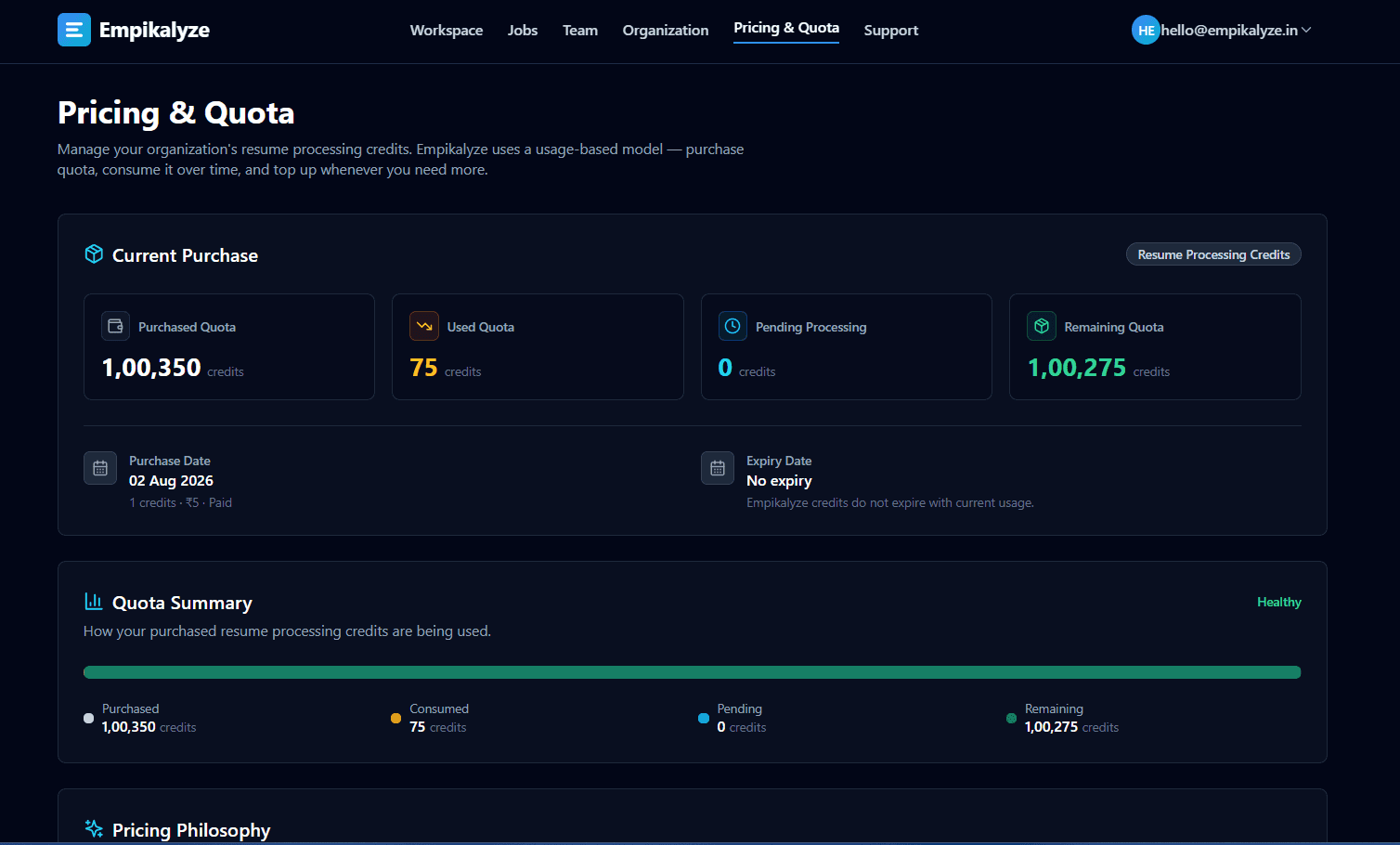
| Figure | Meaning |
|---|---|
| Purchased | Total credits your organization has bought |
| Used | Consumed by successfully processed resumes |
| Pending (reserved) | Held by resumes currently queued or processing — becomes Used on success or returns to Available on failure |
| Remaining (available) | Purchased minus Used minus Pending — what new jobs can draw on |
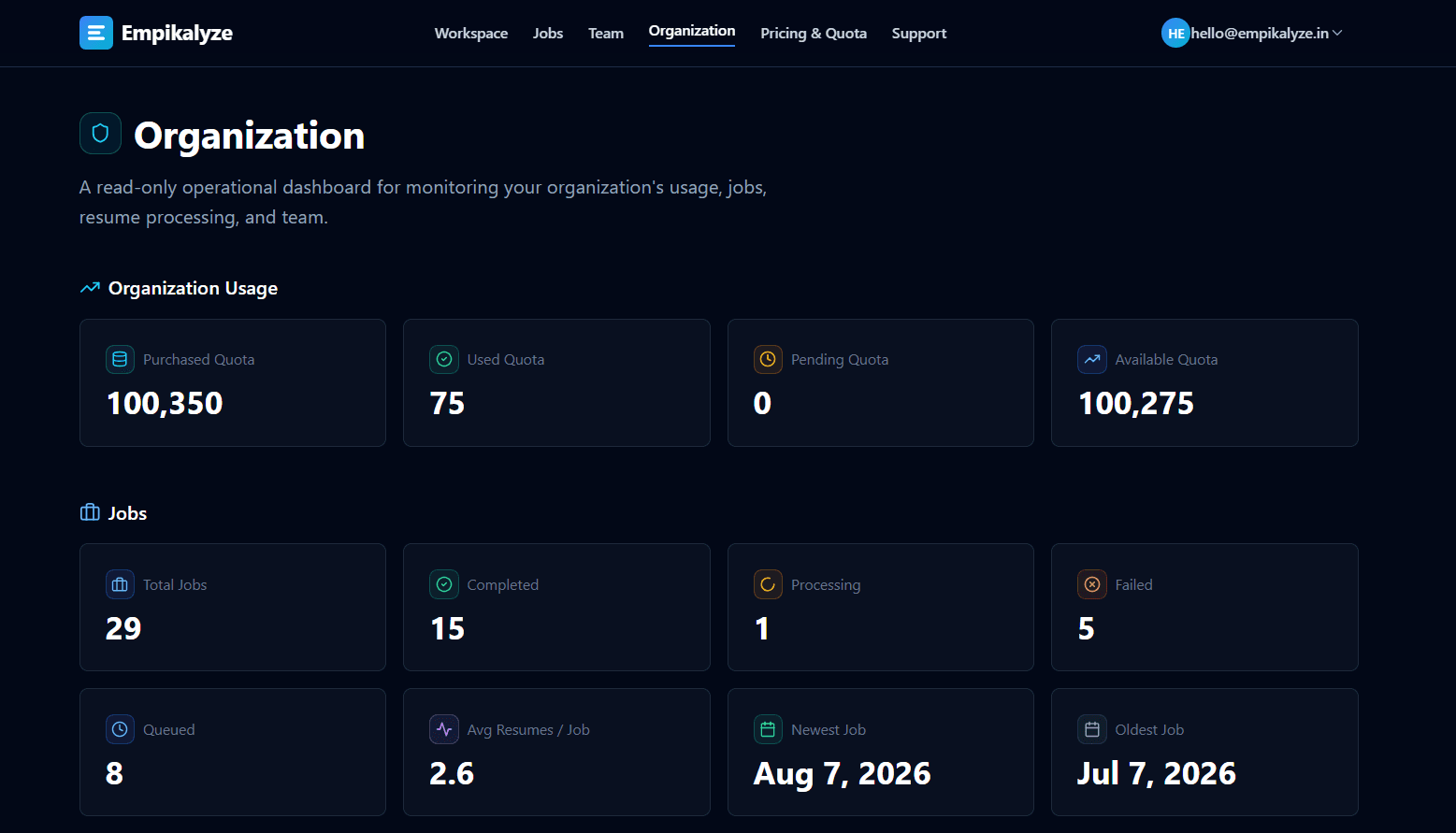
Organization administrators can see all four figures on the Pricing & Quota and Organization pages at any time. If a submission needs more credits than are available, processing is stopped before it starts, nothing is consumed, and Empikalyze shows exactly how many more credits are needed with a direct link to purchase them.
Teams
Team and Organization Workflow
Empikalyze is organization-based: one shared workspace, one shared credit pool, unlimited collaboration.
One organization per signup
The first user who signs up becomes the organization administrator and names the organization (for example, your agency). Further recruiters never create separate organizations — they are invited in.
Invitations, not accounts to manage
Admins invite recruiters by email from the Team page. Each invitee accepts by email, sets a password or signs in with Google, and joins with a recruiter role. Admins can resend, revoke, disable, and re-enable recruiters.
Shared jobs and results
Every screening job belongs to the organization. Admins see all jobs; each recruiter sees their own jobs in their lists and can open shared organization jobs by link. Results, resumes, and exports work identically for every member.
One shared credit pool
All recruiters draw from the same organization credits. There are no per-user quotas, no per-seat charges, and no charge for inviting teammates — pricing depends only on the resumes you process.
Pricing
The Pricing Model
Usage-based and radically simple: you pay for resume processing, not seats, storage, or subscriptions.
Price
₹5 per successfully processed resume
Purchase size
1–5,000 credits per order
Expiry
Credits never expire
What you pay for
Resume Processing Credits, bought on demand by an organization administrator through a secure online checkout in Indian Rupees. Buy the quantity you need — from a single credit up to 5,000 per order — whenever you need it. Larger long-term needs can simply be split across multiple purchases. Credits never expire, so unused credits stay available until your team uses them.
What you never pay for
Seats or recruiters, job postings, viewing and exporting results, storage of resumes and results, team invitations, retries that fail, and failed resumes. If a resume does not produce a screening result, it does not consume a credit.
Early Access benefit
Estimate your costs with the pricing calculator on the homepage.
History
Every Job Stays in Your Jobs Page
Screening history is permanent organization knowledge — nothing disappears when a job finishes.
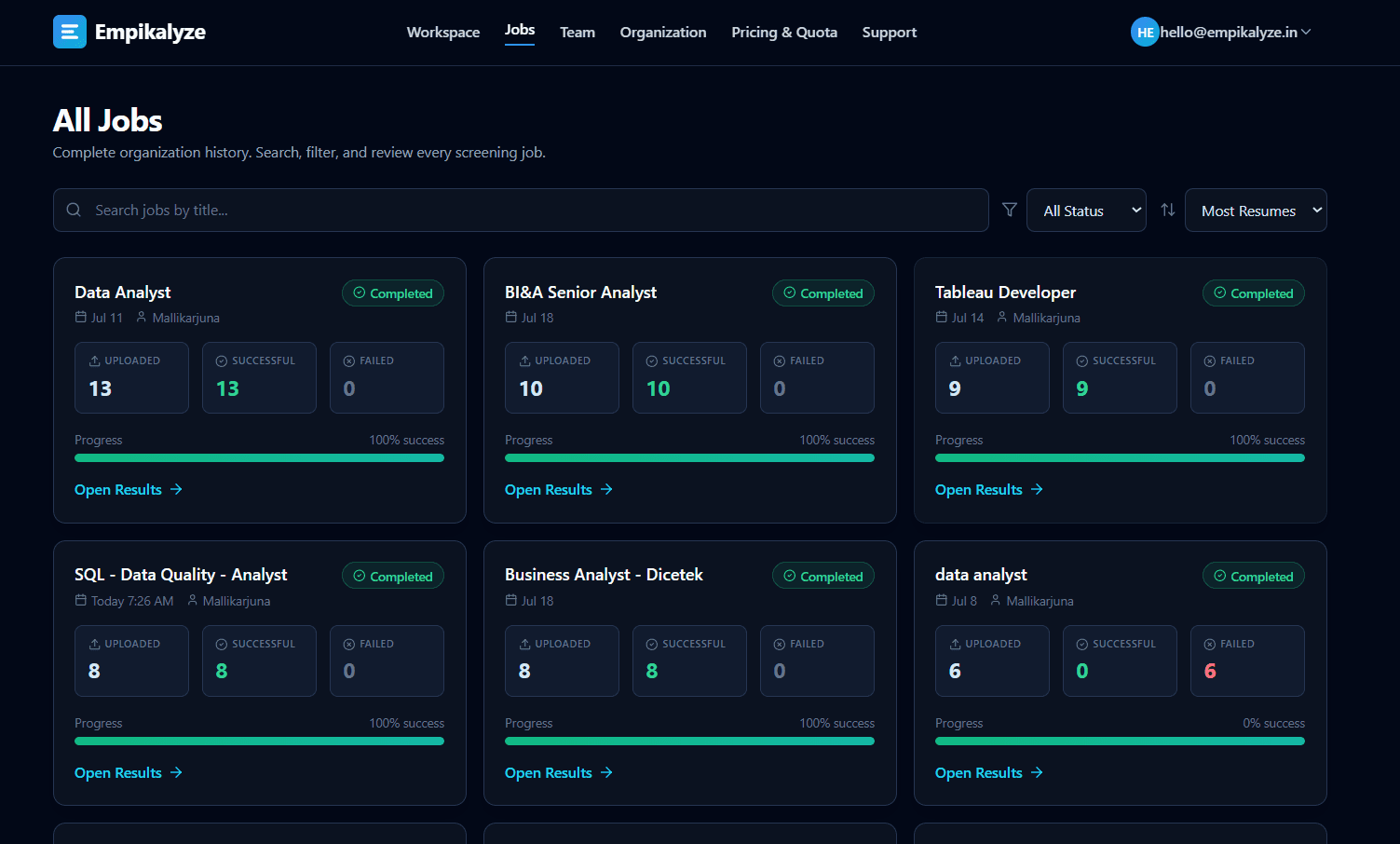
The Jobs page lists every screening job with its status (Queued, Processing, Completed, or Failed), resume counts, success and failure counts, and who created it. Search, filter, and sort to find any past role, then open it to review ranked candidates, retry failures, or re-export the shortlist for a client — all without consuming credits.
Boundaries
What Empikalyze Does Not Do
Knowing the boundary is as useful as knowing the features. Empikalyze deliberately stays in the screening lane.
It is not an ATS or CRM — no pipelines, interview scheduling, offers, or candidate portals
It never automatically rejects a candidate — every ranked candidate remains available for review
It never makes hiring decisions — recruiters decide who moves forward
It never contacts candidates — contact details are surfaced for your outreach only
It does not source candidates or import from job boards — you bring the resumes
It does not guarantee outcomes — AI output is decision support, and human judgment stays in the loop
AI and the human in the loop
Empikalyze's AI evaluates evidence, scores fit, and explains its reasoning — but it is probabilistic, and the recruiter is the decision-maker. Tiers are advisory labels: a “Review Recommended” candidate may be exactly right for context the JD could not capture. Use match scores to prioritize attention, then apply your own judgment, verification, and client knowledge before shortlisting. For a deeper discussion, read our guide to candidate evaluation.
Trust
Data and Privacy Overview
Your recruitment data is confidential business data, and it is treated that way.
Organization isolation
Every organization's jobs, resumes, candidate results, and usage are isolated from every other organization. Members of one organization cannot access another organization's data.
Infrastructure
Empikalyze uses Supabase as part of its data infrastructure, with access controls applied at every layer of the application.
AI processing
Empikalyze uses third-party AI/LLM services as part of its processing architecture. Customer data is not used to train our AI models — screening data is used to produce your screening results.
Retention and deletion
Jobs, resumes, and results stay available so your team can review them over time. You can request deletion of your recruitment data at any time by contacting support.
Full details in the Privacy Policy, Data Security, and Terms of Service.
Transparency
Product Limitations
The honest list — so you know exactly what to expect today.
Text-based resumes only: image-only or scanned PDFs cannot be read yet (OCR is under development)
Resume uploads accept PDF, DOC, and DOCX — not TXT or images (TXT is supported for the job description)
Up to 100 resumes per screening job — larger pipelines can be split across multiple jobs
Up to 10 MB per resume file
AI analysis is probabilistic — always verify critical requirements before shortlisting
No automated refunds: if something goes wrong with a payment, contact support for help
FAQ
Common Questions About How Empikalyze Works
Operational answers — the same rules the product enforces, in plain language.
How does Empikalyze screen resumes?
You create a screening job with a job description and up to 100 resumes. Empikalyze's AI reads every resume against the job description and any extra instructions you add, then returns a ranked shortlist with a 0–100 match score and a full analysis for each candidate. Recruiters review the ranked list and decide who moves forward.
What does Empikalyze do with the job description?
The job description defines the baseline hiring requirements for the screening job. You can paste the JD text or upload it as a PDF, DOC, DOCX, or TXT file (up to 10 MB). Empikalyze extracts the requirements from it, and every resume in that job is evaluated against them.
Can I tell Empikalyze what kind of candidates I am looking for?
Yes. Every screening job has an optional Additional Context field (up to 4,000 characters) for must-have skills, location preferences, notice periods, industry experience, or client-specific requirements. The AI treats this as an extension of the job requirements and summarizes how well each candidate satisfies it.
How are candidates ranked?
Candidates are ranked by AI match score, highest first. The match score is a 0–100 rating of how well the resume matches the job description and your additional context. Empikalyze groups results into three tiers: Highly Recommended (85+), Recommended (70–84), and Review Recommended (below 70).
What does the match score mean?
The match score is a 0–100 rating of how closely a resume fits the job's requirements, considering skills, experience, education, and overall relevance. Higher scores indicate stronger alignment. It is decision support for recruiters, not a hiring decision.
What information can recruiters see about each candidate?
For every successfully processed resume, recruiters see the candidate's name, match score and tier, matched and missing skills, experience level (exact match, under-experienced, or over-experienced) with a short relevance note, education fit, strengths, gaps, an overall summary, and a note on how well the candidate meets the additional context. Email and phone details found in the resume are also shown, and the original resume can be viewed or downloaded inside the app.
Can I upload resumes in bulk?
Yes. Each screening job accepts 1 to 100 resumes in one batch. Files must be PDF, DOC, or DOCX and up to 10 MB each. Duplicate files (same name and size) in the same batch are skipped automatically.
What resume file formats are supported?
Resumes must be PDF, DOC, or DOCX files (up to 10 MB each). Image-only or scanned resumes cannot be read yet — OCR support is under development. The job description additionally supports pasted text or a TXT file.
What happens when a resume fails to process?
The resume is marked Failed with the reason shown on the job page, and it does not consume any credit. Common causes are unsupported formats, corrupted files, or unreadable text. Every other resume in the job continues processing independently.
Can I retry failed resumes?
Yes. When a job finishes with some failed resumes, a Retry Failed Resumes action reprocesses only the failed ones. Successfully processed resumes are not reprocessed and their results stay visible during the retry.
If 50 resumes are uploaded, 40 succeed, and 10 fail — what happens?
The job finishes as Completed: 40 ranked candidate results are available immediately, and the 10 failed resumes are listed with their error reasons. Only the 40 successful analyses consumed credits — the 10 failures consumed none. You can then retry just the 10 failed resumes; that retry reserves 10 credits and consumes one only for each resume that succeeds on the retry. If any fail again, their credits are returned again and they remain retryable.
Are failed resumes charged?
No. A credit is consumed only when a resume is successfully processed and matched. Failed resumes never consume credits, and retries are charged only on success.
Does retrying a failed resume consume quota?
A retry reserves credits again for the resumes being retried, but a credit is only permanently consumed if that resume is successfully processed. If the retry fails again, the reserved credit is returned, so you never pay for a resume that does not produce a result.
What happens if an entire screening job fails?
The job is marked Failed with an error message, and a Retry Job action becomes available. The retry reuses the same job and the same uploaded resume files — you do not upload anything again, no duplicate records are created, and the original job is not left behind as a separate entry.
Does retrying a failed job consume credits?
A full job retry first returns the credits previously consumed by resumes that had succeeded in that job, then reserves credits for the whole batch again. Each resume consumes one credit only if it succeeds after the retry. Failed resumes return their reserved credits.
Are successful resumes processed again during a retry?
It depends on the retry type. Retry Failed Resumes reprocesses only the failed resumes — successful ones keep their existing results. Retry Job (for a failed job) re-analyzes every resume in the job, including previously successful ones, with credits handled as described above so nothing is double-charged.
What happens if a retry fails again?
The resume is marked Failed again with the updated reason, its reserved credit is returned, and the retry action remains available. There is no limit on how many times failed resumes can be retried.
How does the shared organization quota work?
Every organization has one shared pool of Resume Processing Credits. All screening jobs by all recruiters in the organization draw from the same pool, and every successful resume analysis consumes one credit from it. Organization administrators can view purchased, used, pending (reserved), and remaining credits at any time.
Do I pay separately for each recruiter?
No. Empikalyze charges per successfully processed resume, not per user. There are no per-seat fees, and adding recruiters to your organization does not change your price.
Can multiple recruiters use the same Empikalyze organization?
Yes. One organization admin signs up, then invites recruiters by email from the Team page. Recruiters join after accepting the invitation. Admins can also resend, revoke, disable, or re-enable recruiters. Everyone shares the organization's jobs and credit pool.
Does viewing previous results consume credits?
No. Credits are consumed only once, when a resume is successfully processed. Viewing results, filtering, searching, opening candidate details, viewing or downloading resumes, and exporting shortlists are all free.
What happens when quota is insufficient?
If the available credits are fewer than the number of resumes being submitted, processing is stopped before it starts, nothing is consumed, and Empikalyze shows exactly how many more credits are needed with a link to purchase them. The same protection applies to retries.
Is Empikalyze an ATS?
No. Empikalyze is an AI resume screening and candidate evaluation layer that works before candidates enter an ATS. It does not manage pipelines, interview scheduling, offer workflows, or candidate communication. It ranks and explains candidates so your team can decide next steps.
Does Empikalyze automatically reject candidates or make hiring decisions?
No. Empikalyze ranks and analyzes candidates to support recruiter decisions. It never rejects candidates, never makes hiring decisions, and never contacts candidates. The lowest result tier is simply Review Recommended — every ranked candidate stays available for your review.
Does Empikalyze contact candidates?
No. Candidate contact details found in resumes are extracted and shown to recruiters for outreach. Empikalyze itself never emails, calls, or messages candidates.
Does Empikalyze use third-party AI services?
Yes. Empikalyze uses third-party AI/LLM services as part of its processing architecture to analyze resumes against job descriptions. Before resume content is processed by the language model, personally identifiable information (PII) is sanitized using built-in PII guardrails. Customer data is not used to train our AI models.
Is customer data used to train AI models?
No. Customer data is not used to train Empikalyze's AI models. Data uploaded for screening is used to produce the screening results you requested.
What infrastructure does Empikalyze use?
Empikalyze uses Supabase as part of its data infrastructure. Recruitment data is isolated between organizations and protected with appropriate security controls. See the Data Security and Privacy pages for details.
What happens to my recruitment data?
Jobs, resumes, and results remain available in your organization so your team can review them over time. Data is isolated per organization, is not used to train AI models, and can be deleted on request by contacting support.
How much does Empikalyze cost?
Empikalyze uses usage-based pricing: ₹5 (INR) per successfully processed resume, purchased as Resume Processing Credits. Credits never expire, there are no subscriptions and no per-seat fees, and you can purchase between 1 and 5,000 credits per order. Organizations that join through early access get 10% off their first purchase.
Do credits expire?
No. Resume Processing Credits do not expire based on time. Each consumed credit is permanently deducted, but unused credits remain available until you use them.
What should I do if processing fails?
Open the job, review the error reasons on the failed resumes, fix the cause where possible (for example, re-export an unreadable file as a text-based PDF), and use Retry Failed Resumes. If a job-level failure persists, use Retry Job. For anything else, submit a support request in the app or email support@empikalyze.in.
How can I contact support?
Signed-in users can submit a support request from the Support page and track its status in the app. You can also email support@empikalyze.in. Support operates Monday to Friday, 10:00 AM to 6:00 PM IST, and typically responds within 24 business hours.
Get started
Getting Started with Empikalyze
Three ways to begin, depending on where you are in your evaluation.
Try the free demo
Use the playground on the homepage — no signup, no credits. Analyze up to 6 resumes (PDF or DOCX) against a job description, three times per day, and see real ranked output.
Open the playgroundCreate your organization
Sign up with your company name, email, and a password — or Google. You become the administrator, invite recruiters from the Team page, and share one credit pool.
Sign up freeScreen your first job
In the Workspace, add a JD, drop in up to 100 resumes, and submit. Watch results fill in live, then filter, export, and share the shortlist with your team or client.
Start screeningReady to stop reading resumes one by one?
Create your organization, invite your recruiters, and screen your next batch of resumes with a ranked, explainable shortlist — at ₹5 per successfully processed resume.
Support hours: Monday–Friday, 10:00 AM – 6:00 PM IST · Response within 24 business hours
New here? Learn the fundamentals in the Knowledge Hub — start with AI resume screening, semantic matching, and candidate ranking.